My Degree Planner
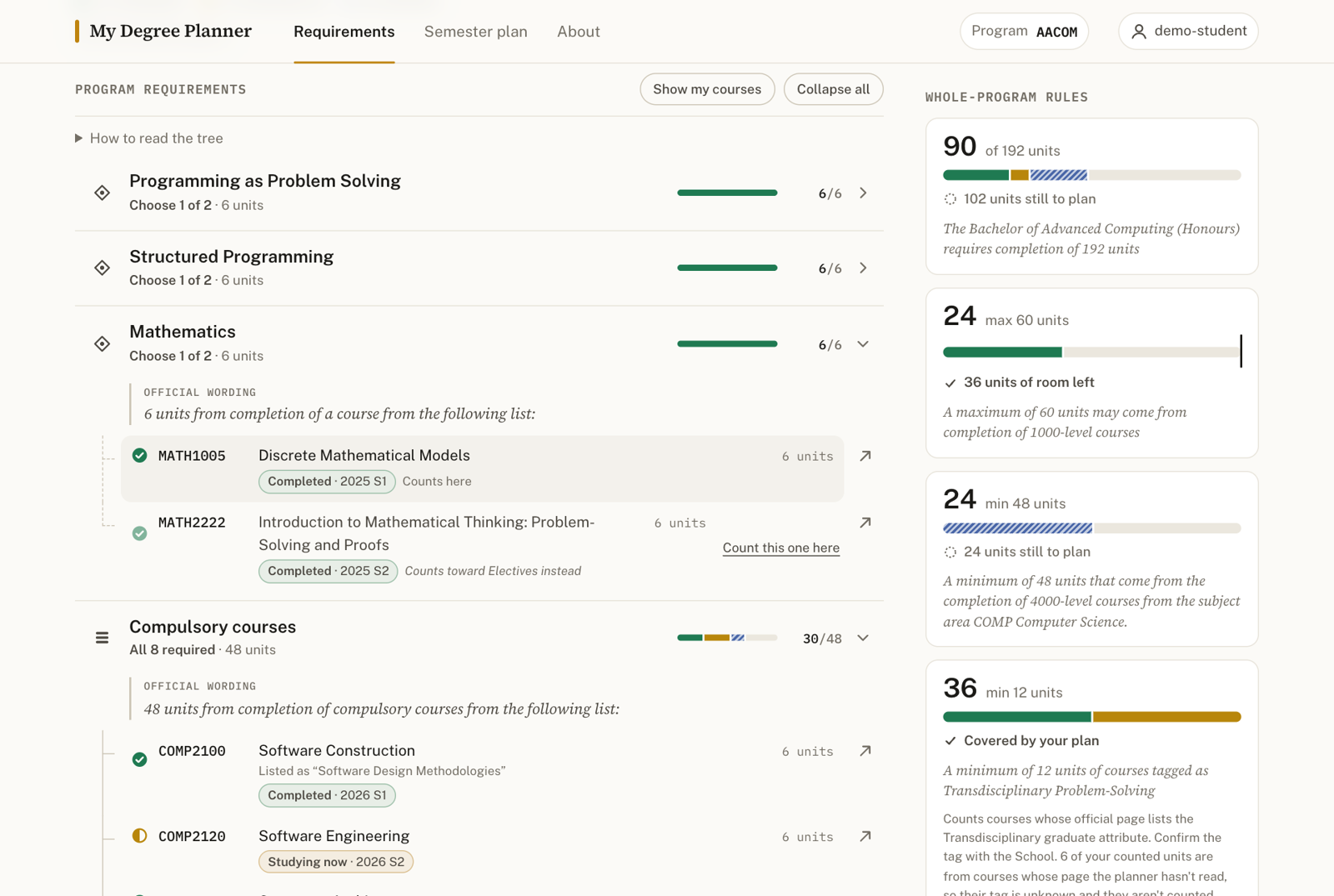
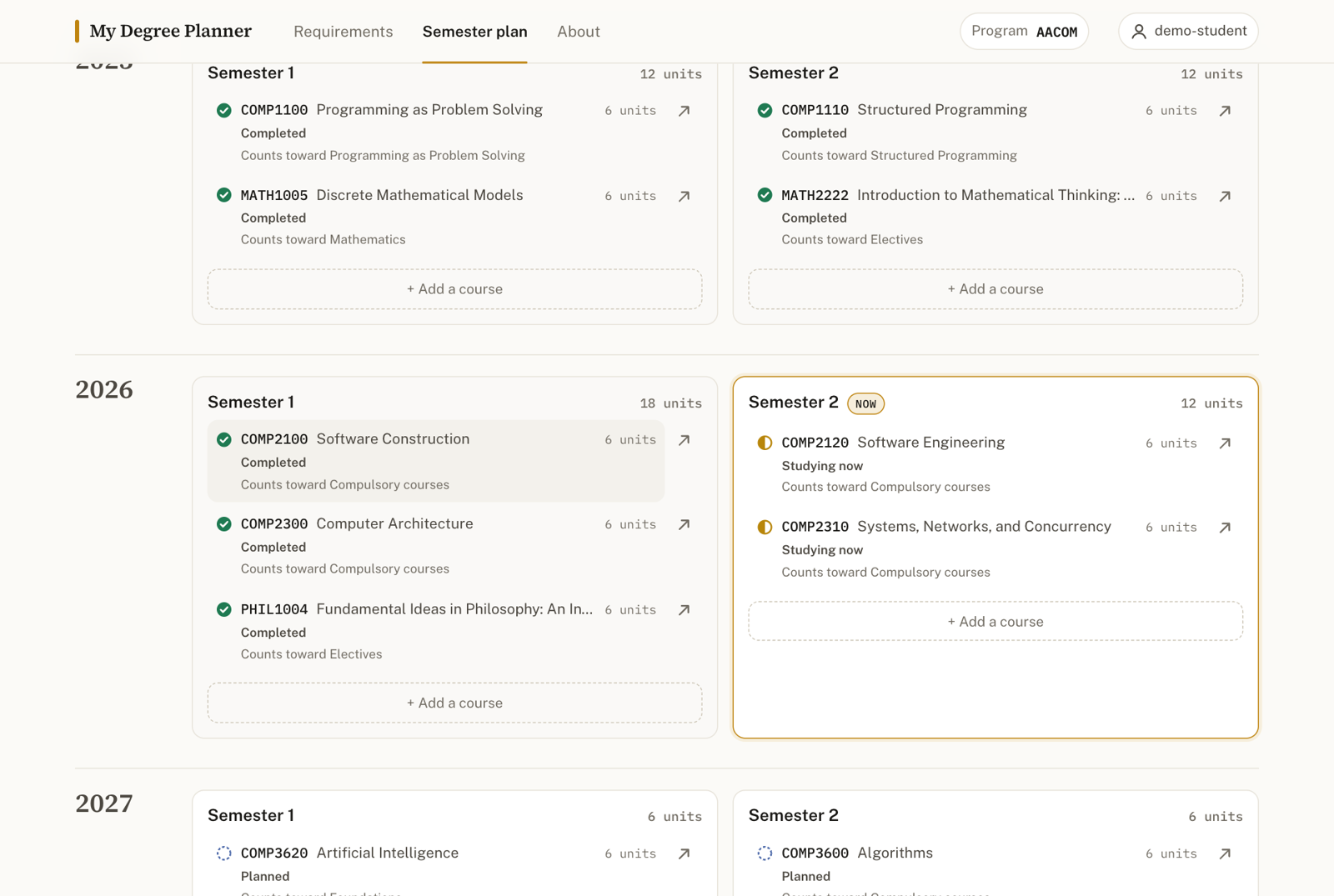
ANU’s Programs & Courses pages hold everything a Computing student needs to know about their degree, but the Program Requirements section is a long block of text: nested “6 units from the following list”, “one of the following specialisations”, “Either … OR … AND …”, plus whole-program rules like “a maximum of 60 units may come from 1000-level courses”. My Degree Planner turns that text for four standalone 2027 Computing programs into an interactive requirements tree. It then lays the student’s own record over it: courses completed, being studied now, and planned for a future semester. The same plan is also shown as a semester-by-semester timeline. Each student has a private My Degree Planner account and plan. It is a planning aid built on the official catalogue, not a degree audit.
What good looks like here
Every academic fact is official, and traceable. Everything comes from the 2027 ANU Programs & Courses catalogue, read on 27 September 2026:
- the four programs (BCOMP, AACOM, AACRD, AENSE)
- the seven majors and five specialisations they point to
- the 98 courses they name
The plain-text extracts, each with its source URL, are committed in
research/2027/. Two further official sources sit alongside them:
- The full course list. Every 2027 undergraduate course (1,523 of them) is
in
ug-catalogue.json, taken from the JSON behind the catalogue’s own search. That list is the only thing a plan can contain. A code that isn’t in it, such as COMP0721, is refused rather than shown as an unverified course with a link to a 404. - Detail from each named course’s own page. For the 98 program courses:
- the unit value
- the 2027 offerings
- the graduate attributes
- the official requisite and incompatibility text, read into structured rules (see “Course rules” below)
- assumed knowledge and co-taught courses
- whether the page says the course runs over two consecutive semesters
Every requirement group shows its official sentence word for word, and the short title above it is only a navigation label. Where sources disagree, the app shows both. The program page lists COMP2100 as “Software Design Methodologies”, its course page says “Software Construction”, and the leaf carries both. The Machine Learning specialisation is listed in the 2027 AACOM requirements but has no 2027 page, so its structure comes from the 2026 page, and the node says so.
Hierarchy one level at a time, with a visual grammar for “and” and “or”. Nothing is expanded when the page loads. Each group has a glyph, a plain-words relation (“All 8 required”, “Choose 1 of 2”, “At least 12 units”, “Up to 12 units · optional”, “One pathway”, “Any 18 units”), and a connector line whose style repeats the relation: solid when every child is needed, dashed when you choose among them, dotted for an open “any course that fits” requirement. Pathways (specialisations, majors, the AACOM final-year options) are cards. The one you choose is marked, and the others show what they would hold if chosen. On a phone the tree becomes a drill-down: one group’s children fill the screen, with a breadcrumb trail back up.
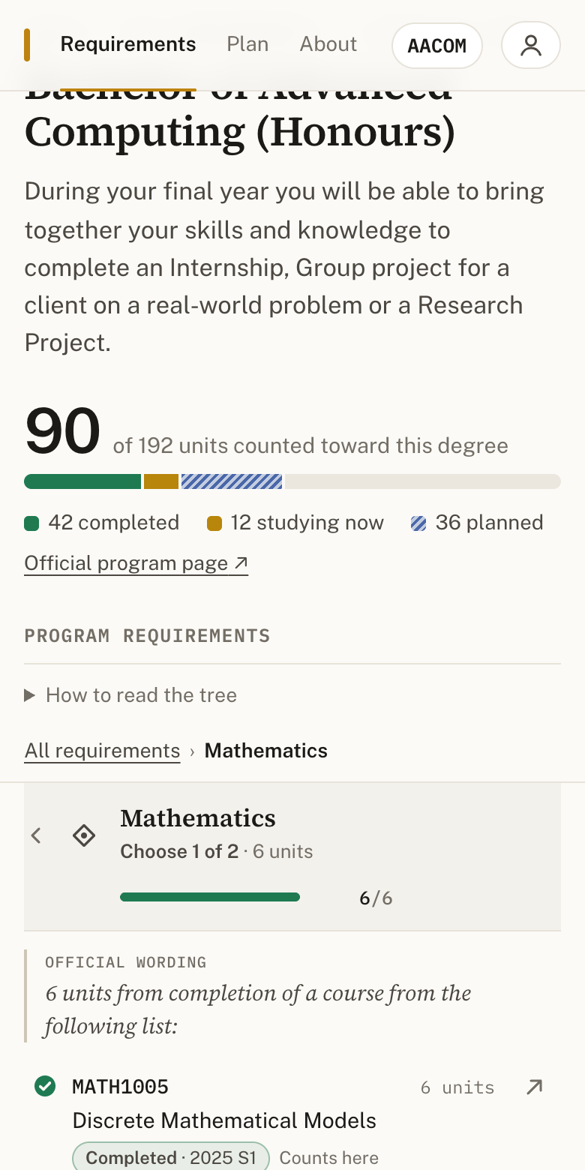
Every course leads to its official page. Every course anywhere in the tree
or the semester plan links to
programsandcourses.anu.edu.au/2027/course/<CODE>. Every code comes from the
verified list, so every link resolves.
A private plan, one record per course, one calculation.
- What’s saved: a student picks a program, then records each course as Completed, Studying now or Planned, with a year and session. The chosen program, every entry, every pathway choice and every choose-one selection are rows in SQLite belonging to that student’s account.
- One record per course: a course is in a plan once, enforced by
UNIQUE(user_id, course_code)in the database, not only by the interface. Adding it again explains where the existing entry is and offers to move it. - Two-semester courses: a course its page says runs over two consecutive semesters (COMP3500, COMP3770, COMP4500, COMP4550, ENGN4300, ENGN4350) is still one record. It appears in both of its semesters.
- Two views, one set of numbers: the requirements tree (
/) and the semester plan (/plan/) read the same evaluation, so the headline, every tree node, the whole-program rules and the semester summaries always agree.
How progress is counted
Taking a course and having it satisfy a requirement are different things, and the tree shows both. Each course record credits at most one requirement, never more units than that requirement or any group around it can hold. Credit is given in this order, across the part of the tree in play (chosen pathways only):
- compulsory courses
- exact “choose” lists
- “at least” bands
- “up to” bands
- open requirements with a filter (“18 units of 3000/4000-level COMP”)
- unrestricted electives
A course goes whole into the first open requirement with room for it, and never splits across two. In a choose-one list such as “Choose 1 of 2 · MATH1005 / MATH2222”, only one course counts, and the other shows “Counts toward Electives instead”. The student can switch which one counts (“Count this one here”); the server checks the requirement, the option and that the course is in their plan. Adding the other option of a choose-one list offers to replace the course that currently counts, or to record both. Where the official pages list the two as incompatible (COMP1100 and COMP1130, for example), the second is recorded but counts nowhere: “Recorded in your study history · 0 units currently counted toward this degree”. Course history and requirement allocation are separate things, and a record is never refused as a way of fixing a count.
Whole-program rules sit beside the tree. Total units, the 1000-level maximum, the COMP level minimums and the Transdisciplinary Problem-Solving minimum are quoted in full and measured against the units that count toward the degree. Rules the planner deliberately doesn’t evaluate are listed separately: the AACRD 75%/80% WAM progression rules and the honours calculations.
Course rules
Each program course’s official “Requisite and Incompatibility” block mixes different kinds of statement:
- prerequisites, with nested AND/OR groups, unit counts, exclusions and marks
- co-requisites (“completed or be currently studying”)
- program restrictions
- permission requirements
- incompatibilities
- plain advice
An earlier version flattened each block into a list of codes and treated them all as incompatible. COMP3320’s block, for example, was read as saying it was incompatible with its own prerequisites. That model is gone.
src/lib/rules.ts now reads a block in three conservative steps:
- It splits the block into clauses by their opening words (“To enrol…”, “Incompatible with…”, “You are not able to enrol…”, “You must also be studying…”, permission wording), taken from the page’s own line structure.
- It reads a prerequisite into an expression tree only if every token is understood. The tree holds courses, co-requisite options, marks, “N units of subject X at level Y excluding Z”, and program nodes.
- Anything else is kept word for word, flagged, and never turned into a harder rule than the page states.
Rules the parser can’t read completely have a hand-reviewed reading in
src/data/rule-overrides.ts (24 of 98), each pinned to the exact official
text it was checked against. Where the wording is genuinely ambiguous (INFS3059
doesn’t say which alternative its enrolment condition covers), the planner
shows the wording instead of choosing a reading. The result is:
- 73 of the 98 courses fully structured
- 18 partly structured (marks, eligibility steps and unmapped programs stay as flagged wording)
- 1 wording-only
- 6 with no rules
Two things keep this from regressing:
spec/course-rules.test.tsvalidates every course on everypnpm check:- an incompatibility must be named in an incompatibility clause
- no course may be both a prerequisite and incompatible
- every code in a prerequisite must appear in the official wording
- “complete” readings contain no leftover wording
- a hand review whose source text has changed fails loudly
node scripts/audit-rules.tsprints every official block beside its reading, for a person to review after a data refresh.
The course panel shows the rules under their own headings: Prerequisites (as groups), Co-requisites, Incompatibilities, Other enrolment conditions, Assumed knowledge (advice, not a requirement), Co-taught with, and the Official wording, with a note when some conditions couldn’t be interpreted.
How rules are applied
Rules depend on the record’s status:
- Completed is a historical fact. It’s always accepted, whatever its 2027 prerequisites or incompatibilities say, because earlier years’ rules, credit, substitutions and permissions all exist. It’s never warned about its course rules.
- Studying now is accepted, with course-rule findings shown only as notes.
- Planned gets planning checks, group by group, and chronological: a prerequisite counts only if it ends before the planned course starts. For COMP3320 planned after COMP2100 the panel says “Your plan shows COMP2100 (Completed · 2026 S1), which appears to satisfy the first prerequisite group”, and warns that the plan does not yet show the second group before 2027 Semester 1. Warnings never block; the button becomes “Add anyway”.
| Refused (data integrity) | Planning warnings, for Planned courses (notes otherwise) |
|---|---|
| A second record for a course already in the plan | A prerequisite group the plan doesn’t show before the course |
| A code that isn’t in the 2027 undergraduate catalogue | An official incompatibility with a course in the plan |
| Units outside the course’s official range | More than 24 units in a study period (overload needs approval); more than 36, which ANU policy says is never permitted |
| Malformed input, an ended session, or an entry that isn’t yours | A 2027 session the catalogue doesn’t list; a two-semester course starting outside a semester |
| Status that contradicts the calendar (planned in the past, completed in the future) |
The load figures come from the ANU Student academic study load and progression
policy (research/policy-study-load.txt, clauses 12 and 20). The server
returns each refusal with its own status and code, and each save with its
warnings and notes:
- 400 for invalid input
- 401 when the session has ended
- 404 for an unknown course, or an entry that isn’t in your plan
- 409 for a duplicate
Accounts and privacy
This is a My Degree Planner account, not your ANU account. Never enter your ANU password here.
- What an account is: a username and password that exist only in this app. Nothing imitates the ANU sign-in, and a student number is never used as identity.
- How passwords are kept: salted scrypt hashes, never in plain text.
- How sessions work: a random token in an HttpOnly, SameSite cookie. The database stores only its SHA-256, and failed log-ins are throttled per username.
- Who a request acts for: every route learns the user from that session, never from anything the browser sends. Every query, mutation, reset and live-update event is scoped to that account. Asking for someone else’s entry by id is simply “not found”.
Before accounts existed, every visitor shared one anonymous demo user. Its data
couldn’t be attributed to anyone and included duplicates and a fabricated code,
so migration 0003 clears it. The migration trail was checked against a copy
of that production data before deploying.
Where it stops
- a planning estimate, not an audit: course-rule findings are conservative warnings, not authoritative eligibility decisions; complex marks, permissions and progression conditions may remain as official wording rather than being evaluated, and timetables are not modelled
- a two-semester course has one status for both semesters
- local rules inside majors and specialisations (“a maximum of 18 units may come from 1000-level courses”, incompatibilities between a major and a specialisation) are shown as notes, not checked
- detail such as course rules, the Transdisciplinary attribute and variable unit ranges is only known for the 98 courses whose pages were read. For the rest the catalogue listing gives title, units and sessions, and the Transdisciplinary count says when a tag is unknown
- study history is entered by hand
What was left out on purpose: combined and double degrees, every other ANU program, course recommendations, authoritative prerequisite enforcement, timetable clashes, GPA, financial information, enrolment, and any ANUHub or ISIS access. Reading a student’s results automatically would need an officially approved ANU integration; there is no public interface for it, and this app never asks for ANU credentials. A possible future step would be importing a Statement of Results with the student’s explicit consent, extracting only course codes and terms and keeping neither the document nor the marks. That is not built.
What’s enforced, and what’s judged
pnpm check holds the mechanical promises:
spec/degree-planner.test.tsdrives the running server over HTTP:- signed out: the landing page carries the account notice, private pages redirect to log in, and the API answers 401
- accounts: weak passwords and taken usernames are refused, the right password logs in, and logging out ends the session
- two accounts see only their own program and courses, can’t edit or delete each other’s entries, reset only their own plan, and receive only their own live updates
- one record per course: a duplicate gets 409 and says where the original is; moving it works; unknown codes are refused
- editing between statuses and removing update both views, and each bad edit gets its own status and code
- study-load warning and limit
- choose-one credit and selection
- the headline equals the whole-program total
- collapsed groups, official links on every course in all four trees, and an accessibility floor on the populated pages
spec/course-rules.test.tschecks the rule reader on representative official structures, validates all 98 courses as above, pins the COMP3320 regression, and covers status policy and the history/credit splitspec/requirements.test.tschecks, without a server:- the verified catalogue: 1,523 courses, two-semester evidence, and the full catalogue
- the transcription arithmetic: each program adds up to 144 or 192 units, and every fixed group to its official units
- the allocation rules above
- the consistency checks
- password hashing
spec/invariants.test.tscovers/,/login/,/signup/and/readme/, andspec/readme.test.tschecks this page is served in full.
pnpm e2e (e2e/planner.e2e.mjs) drives a real browser against a running
server through the flows only a browser can show: two accounts, duplicate
then move (never into the semester it’s already in), editing, Remove with
Undo, choose-one switching and replacement, “Add anyway”, COMP3320’s rules
under the right headings, one announcement per action, unknown courses, an offline save, focus returning after Escape, the program
switcher’s accessible names, a scoped reset, logging out and back in, and the
mobile drill-down with reduced motion.
What only a person can judge: whether the tree is genuinely easier to follow than the official text, whether “counts here / counts toward … instead” makes the difference between taking and counting clear, whether the motion explains structure rather than decorating it, and whether the look is calm and recognisably ANU without imitating its site.
Running it
mise install
pnpm install
pnpm dev      # http://localhost:4321
pnpm check    # types, build, and every spec above
BASE=http://localhost:4321 CHROME="/path/to/chrome" pnpm e2e
The schema lives in src/lib/schema.ts and its migrations in drizzle/,
applied at boot. Reference data (courses and programs) is re-seeded from
research/ and src/data/ on every boot, and personal tables are never touched
by the seed.